
– 软件性质:Freeware
– 软件大小:356KB
– 软件下载:
昨天小众友人,抢小众沙发爱好者 Paveo 问我怎么把 Firefox 3 变成 portable 的?portable 就是便携版,可以放在在 U 盘并在任意电脑使用的版本。
我回答:
一般都是直接在原来的 portable 的升级就行了,或者去 portableapps 下载最新的,或者手工打造一个。
Firefox 有个启动参数:profile,利用这个参数,就可以实现 DIY 一个自己的 portable。怎么用呢?为 Firefox 新建一个快捷方式,然后,打开快捷方式的属性,在目标后面加上“[空格]-profile F:Profiles”,如下图
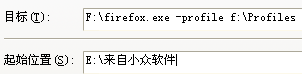
这样做,每次换电脑,因为 U 盘盘符的改变,所以要修改一下快捷方式的目标盘符,非常不方便。
如何完美实现呢?
用了原版的朋友,请打开 C:Documents and Settings你的用户名Application DataMozillaFirefox 把 Profiles 复制到 firefox 所在文件夹,然后 firefox paveo portable.exe,也放到 firefox 所在文件夹。如图:
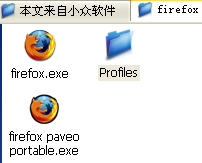
不是只保留这三个文件。)
然后把整个 firefox 文件夹复制到 U 盘。大功告成!以后运行 firefox paveo portable.exe 就可以了。
如果是从 Portableapps 下载的版本,profile 文件夹在 Data 下。记得改名为 Profiles,并复制到 Firefox 下。其实也没必要用这个 firefox paveo portable.exe 了,都已经是 portable 了还折腾。
如果你对 portable 版,不能同时运行两个 firefox 而烦恼的话,可以试试这个。我修改过 portable 版的配置文件,据说可以同时运行 N 个,以失败告终。
我只用了一句 AHK 命令:
run %A_ScriptDir%firefox.exe -profile %A_ScriptDir%Profiles
A_ScriptDir 代表被运行的 AHK 脚本所在的路径。
下载(246KB):来自小众软件|box.net|mediafire
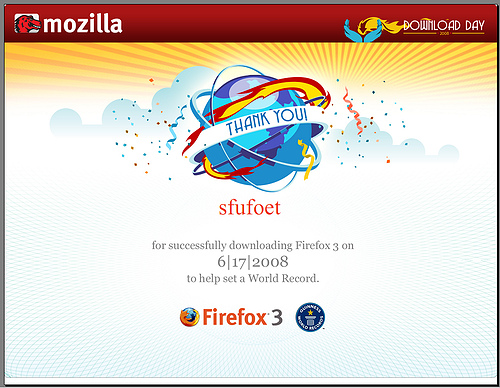
p.s.1 今天下载了 firefox 3 的棕油别忘记去领一份下载证书(via)哦:
p.s.2 Firefox 3 正式版的真面目竟然是 RC 3!
p.s.3 有请资深 portable 砖家 est 评论:
放弃 NSIS 做的 portable 吧。直接用 firefox.exe -profile 启动参数指定配置文件路径。
也就是一个快捷方式~~~
我还实现了 FF2+FF3 在 Mac、Windows、Ubuntu下用同一套profile
就是插件有点恼火,不兼容 ~~


![[Firefox]LessChrome HD - 隐藏导航栏 4](https://www.appinn.com/wp-content/uploads/1334475-115x115.jpg "[Firefox]LessChrome HD - 隐藏导航栏 5")
![[Firefox]Download Scheduler - 定时下载 5](https://www.appinn.com/wp-content/uploads/General-20110411-011539-115x115.jpg "[Firefox]Download Scheduler - 定时下载 6")
沙发,没有二嫂的沙发不是真正的沙发!
好用噢。。
ff3也好用
哇哈哈哈
没想到大诗人也会干抢沙发的事,哈哈!
韶华不再啊……沙发渐渐离我远去……
不过说起来也奇怪,之前一直用得好好的。今天我的Portable的firefox崩溃了好几次。
firefox慢死了……
真的没有opera好
电脑是不是内存太少。。
NSIS做的引导器可没这么简单哦,他先通过检查特定的文件确定Firefox主程序所在目录,然后检查是否存在配置文件,若不存在则从默认配置文件夹复制一份配置文件到配置文件夹,然后检查几个主要的配置文件中一些重要的参数设定是否正确等等等等,有一系列为了保证程序正常工作所做的操作,所以程序相当稳定,就算目录结构稍有变化或者缺少几个必要的配置文件他也是能正常工作的,最后才是启动Firefox主程序并退出引导器。所以NSIS做的引导器也还是有他存在的必要的!
专业!原来如此。
坚定抛弃 NSIS 做的。这样不就让 ff 启动更慢了。
实际工作时大多是检测到文件存在然后直接跳过相应代码的,所以对启动时间的影响并不大。
FF3 Final就是RC3?
我觉得很奇怪,那个链接使用md5证明这一点的。
可是就算两个再一样,help->about里面的版本信息还是有点区别的吧。两个有一点点区别的程序打包以后还是会有一点点区别的吧,一点点区别在md5里面按照我的理解应该是会产生很大的差别的吧……
有没有谁解释一下?
关于从 RC1 就没变过。。。
用hoekey吧
*ff=run|firefox\firefox -profile firefox\Profiles
也很简单
hoekey 也行。呵呵。thx
用AU3吧
Run(“firefox\firefox -profile firefox\Profiles”)
也很简单
用 NirSoft 的 nircmdc.exe 创建个快捷方式也行..
一个批处理就可以解决问题了。
从各位大侠的回复看来,用hoekey的方法确实显得太过复杂了
简单的au3、批处理才是正道啊
不过这样似乎会有一个问题: 当新增扩展后firefox提示重启时, 如果点击firefox的重启按钮, firefox并没有以原有的启动参数(-profile xxx)来启动.
多谢 0401 的留言提醒。
强烈支持使用profile参数启动…
这么折腾干什么,有多少人是共享FF的?
火山那条 AHK 转换为 AU3 代码:
Run(@ScriptDir + “\firefox.exe -profile ” + @ScriptDir + “\Profiles”)
RC就是候选的意思嘛
我觉得用快捷方式更加简单
例如:D:\Firefox\firefox.exe -profile .\Profiles
“.\”就可以表示当前目录
哦,不好意思,我想得太简单了
程序的路径没法解决
me too
小众啊,,给我们打造下gladder吧,更新FF3后,gladder一直没更新,我是一天也不能离开这个东西啊。。
要不,你给我信推荐一款好用的?
用过这么多,仅仅觉得gladder方便。
用花儿的办法吧:http://blog.istef.info/2008/02/21/firefox-3-beta-3/
U啊,F啊,都很棒
现在用上了Tor+Firefox+FoxyProxy,比以前的gladder更强大了,可惜tor网速太慢,代理得自己找,,这个组合功能强大,可惜我弄了好久才上手。。不过,谢谢小众了,还有邮件通知。
推荐使用GProxy Tool+相应的XX软件 速度要比用tor快多了
[…] 用 AHK 打造自己的 Firefox Portable […]
FX3就是RC3,我用的RC3原先就显示FX3.0,自动更新一直没发现更新的版本。不过下载日还是下了两次,下完直接删除。
不知道使用profile参数启动有什么作用?是说FF在U盘里快捷方式在电脑上吗?那好像不用参数也一样,或者是其他作用?
指定配置文件夹,这样就可以用多个配置,让不同版本的 ff 共享一套配置。
哦 了解
用profile参数做的便携版要怎么设置成系统的默认浏览器?
firefoxportable用defaultmyffp就弄好了,很方便,这个行么?
退出 ffp 会自动欢迎么?
自动欢迎是什么? 没见过…
我用AHK做的Firefox启动器,可以用来做便携版,可放在任何位置运行,可以用不同配置,可以设为默认浏览器.
这里可以下载编译好的软件,还有原代码:http://sites.google.com/site/jdchenjian
刚才做泡面时打开了你的泡面计时器,不过没有出现应有的对话框,而是
—————————
泡面计时器.ahk
—————————
An older instance of this script is already running. Replace it with this instance?
Note: To avoid this message, see #SingleInstance in the help file.
—————————
是(Y) 否(N)
—————————
什么意思,另外我试了一下,别的没有问题。
感动到泪奔了,竟然有人用那个泡面计算器!!
因为你运行了两次泡面计时器。只要选择 y 就可以了。
为什么会运行了两次捏?我猜你今天泡了两次。。。或者是鼠标不灵活了,点一下,变4下。
downloads.sourceforge.net 已经被GFW干掉了,而portableapps 的软件在上面呢!没法下呀,想办法呀
没办法,请用 u f g:
http://www.appinn.com/u/
http://www.appinn.com/f/
http://www.appinn.com/g/
似乎路径中有空格就不行?会说已经有Fx在运行,必须在profiles路径参数两边加”。
run, %A_ScriptDir%\firefox.exe -profile “%A_ScriptDir%\Profiles”
这样就行了。
另:还是会生成C:\Documents and Settings\你的用户名\Application Data\Mozilla\Firefox\目录
加了一句:
#NoTrayIcon
run, %A_ScriptDir%\firefox.exe -profile “%A_ScriptDir%\Profiles”
多谢留言指正
需要在profile 参数后面加上引号,否则放在目录名有空格的目录下就无法启动firefox,比如我的firefox在d:\program files\network\firefox,用博主的脚本就无法启动,做如下修改就可以了
run %A_ScriptDir%\firefox.exe -profile “%A_ScriptDir%\Profiles”
多谢提醒。
放在目录名有空格的目录下就无法启动firefox,为什么需要在profile 参数后面加上引号?朋友能给个详细点解释吗?
照着做了一下,启动firefox paveo portable后,FF中貌似读不到我的Profiles文件夹,是不是还缺点什么?
可以正常启动的。。。。
这种方法制作出来的FF,与普通的是不是没有什么差别?
我其实是想将FF放到MyDropBox上面,这样公司可以家里可以进行同步的
谢谢咯
@jecoso, 跟官方的portable版有什么差么?搞不懂了呵呵
@jecoso, portable 版本的功能上面有读者说到了。可能我忘记加双引号,导致无法识别带空格的路径。抱歉。
建议,用原文中的:
Firefox 有个启动参数:profile,利用这个参数,就可以实现 DIY 一个自己的 portable。怎么用呢?为 Firefox 新建一个快捷方式,然后,打开快捷方式的属性,在目标后面加上“[空格]-profile F:\Profiles”,如下图
@sfufoet, 谢谢
摸风,完全看不懂
直接加参数 -profile “Profiles” , 然后放U盘不就得了~折腾那么多!