
Bing.com 是微软推出的搜索引擎,其在推出第二天就惨遭高墙,还好后来可以访问。
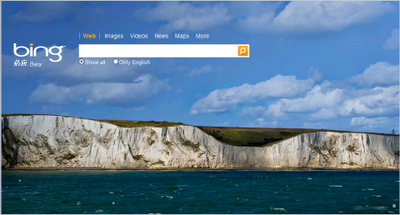
Bing 会每日推出不同的背景图片来取悦用户。@scavin 在 twitter 上询问了几个朋友
@xiaoqiangzzl 说:每天看 bing 的图片成为一个新的娱乐项目~
而如果你想查看往天的必应背景图片,@Ratoo 同学给出了 Bing Image Archive 去欣赏。
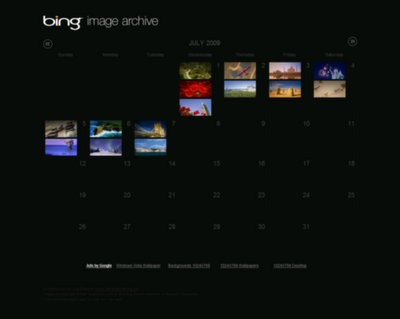
另外,还可以通过 Bing Downloader (需要 .NET3.5,下载: uushare | filefront) 下载每日的背景图片。Bing Downloader 是一款 12KB 的应用程序,功能很简单,打开它之后自动显示并下载当日的必应背景图片。你需要做的只是每天某个时段运行一下 Bing Downloader 即可,图片保存在 Bing Downloader 所在路径的 BingImages 文件夹。
恩,围观必应去吧!


![Coin Stats - 追踪并记录 1000 多种加密货币的价格 [Web/iOS/Android] 4](https://www.appinn.com/wp-content/uploads/iphone8-1.pngo_-115x115.png "Coin Stats - 追踪并记录 1000 多种加密货币的价格 [Web/iOS/Android] 4")

似乎是沙花啊…oh yeah
背景么,每天必去deskcity.com
@ahaFly, 沙花?还灰机来
沙花的大腿
这…还真是沙花.哥哥幸福了.
虽然每天都来小众,可是似乎没留言过…说欢迎回来…
忏悔一下.
这个不错,有新意,小众就该出这样的文章
搜索结果不咋地,外表再漂亮也无视!!!
发现 sfufoet 最近很少发文啊。
发现浏览这篇( http://www.appinn.com/add-useful-shortcuts-in-my-computer/ )打开是移动版?
@Fangs, 最近忙到爆了。。我打开不会出现移动版啊。
无视中
这也可以。。。
微软有病。。。。
逐末。。。
小众当家,请问这款软件怎么安呀?
Tegaki手写识别软件
tegaki.sourceforge.net
@121212, 请安装 python(http://www.python.org/),然后下载 tegaki-0.1.tar.gz,解压后,运行 setup.py 试试。
@sfufoet, 谢谢。
感觉搜索引擎,速度还是很关键的,那么大的背景图一定对页面加载速度有影响,不过这也算是微软必应吸引用户的一个方法吧
没去过呢还
炒作,有什么意思呢
晕,这都要点net????
php直接写个十来行的就可以取到,打包成exe就行了咯
过一会儿我发一个,嘿嘿
@奇怪的jane, 只要看到NET字眼就不舒服。。。路过。
无视必应,更无视必应的背景,飘!~~~
还不错,图片挺漂亮的·
有没有高分辨率的图片?
无视任何小于10M却需要微软框架的程序
scavin,scavin,有没有围观veryCD的标题的程序啊?
@甲醇乙醇, http://www.douban.com/group/topic/7158814/
意义?
需要那么麻烦吗?
给你们个简单的方法:
让您的Windows桌面每天都与Bing保持同步,你只需要在记事本中填入以下代码,然后保存成Bing.theme,切换好就行了。
具体代码如下:[Theme]
DisplayName=Bing
[Slideshow]
Interval=1800000
Shuffle=1
RssFeed=http://feeds.feedburner.com/bingimages
[ControlPanel\Desktop]
TileWallpaper=0
WallpaperStyle=0
Pattern=
[ControlPanel\Cursors]
AppStarting=%SystemRoot%\cursors\aero_working.ani
Arrow=%SystemRoot%\cursors\aero_arrow.cur
Crosshair=
Hand=%SystemRoot%\cursors\aero_link.cur
Help=%SystemRoot%\cursors\aero_helpsel.cur
IBeam=
No=%SystemRoot%\cursors\aero_unavail.cur
NWPen=%SystemRoot%\cursors\aero_pen.cur
SizeAll=%SystemRoot%\cursors\aero_move.cur
SizeNESW=%SystemRoot%\cursors\aero_nesw.cur
SizeNS=%SystemRoot%\cursors\aero_ns.cur
SizeNWSE=%SystemRoot%\cursors\aero_nwse.cur
SizeWE=%SystemRoot%\cursors\aero_ew.cur
UpArrow=%SystemRoot%\cursors\aero_up.cur
Wait=%SystemRoot%\cursors\aero_busy.ani
DefaultValue=WindowsAero
Link=
[VisualStyles]
Path=%SystemRoot%\resources\themes\Aero\Aero.msstyles
ColorStyle=NormalColor
Size=NormalSize
ColorizationColor=0X6B74B8FC
Transparency=1
[MasterThemeSelector]
MTSM=DABJDKT
软件非常不错!