
Desktop Zoom 是一个强大的放大镜工具,最具特色的功能就是把某个小区域放大到全屏幕。非常适合用投影仪讲课的老师们。

从上图可以清晰地看到,屏幕已经变成一个缩略图在右下角,而全屏显示的是一个局部。
该软件还有发声功能:在 Entire desktop 模式下有个 Speech,可以选择发声引擎。如果你安装了微软 TTS 语音朗读引擎,就会发现有一个 Microsoft TTS Engines 可以选择。
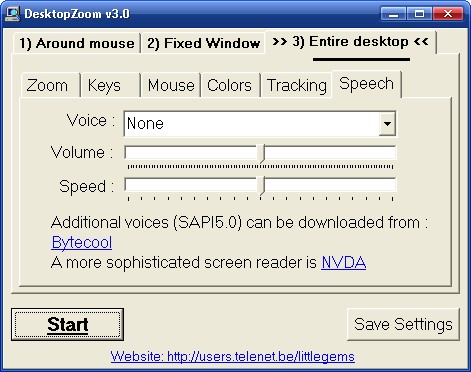
从上图可以看到 Desktop Zoom 支持三种放大模式:Around mouse(和系统自带的放大镜差不多)、Fixed Window(把屏幕的一半作为放大镜)、Entire desktop(最具特色的全屏放大)。
各方面功能的设置都非常详细。
缺点:切换窗口的时候,会返回正常的桌面。
下载(328KB):官方网站|来自小众软件|box.net|mediafire
p.s.1 如何返回正常桌面?刚开始我也被搞晕了,Esc 是退不出来的。要把鼠标移动到屏幕右下角最后一个点。
p.s.2 本来 scavin 昨晚说他有空更新,结果跳票了。所以又是我来更新。

![TaskBadges - 文本 Todo 列表助手 [Mac] 3](https://www.appinn.com/wp-content/uploads/mzl-azpjahzf-115x115.jpg "TaskBadges - 文本 Todo 列表助手 [Mac] 3")

沙发咯。。
你坐沙发我就坐你腿上
我再坐你腿上!!爽!!
我腿麻了。。
呃…那我骑在你肩上好了…^_^
再挂一个孔雀开屏
其实 macbook 下直接 ctrl+双指触摸就是这个功能,而且有视频渲染,不会出现锯齿。。。
没了……
能不能用这个放大镜找找我的沙发?
自己找。。
晚了 已经被Paveo用掉了
最近在玩鼠标指针了?我以前一个文件夹里收集了五六十套指针。
不是。那个愣头愣脑的鼠标是这个软件自带的。
火山系统那个蓝光标也挺难看的……其实我真不愿意说实话……
@李二嫂的猪 难看。。。那个可是 jjying 做的!搜索一下 jjying 是谁吧。嘿嘿。
火山有点逻辑不通。
我也发觉了
我一直在找的好东西!以前看CHM电子书的字体太小,试了几款放大镜软件都不满意。我想要的是放大的同时鼠标键盘还起作用,要不怎么翻页呢?谢谢sfufoet介绍的好软件!
功能挺多,但放大时有点锯齿,不像linux 3d桌面里的效果好。不过2D下能这样已经不错了。
用滚轮 + Ctrl 就可以放到 chm 的文字。
搞错了。不行。
教你一招秘籍:右击某个 chm 页面选择“属性”,然后把地址复制下来,比如:
mk:@MSITStore:F:\AutoHotkey\AutoHotkey.chm::/docs/AutoHotkey.htm
然后复制到 IE 里,粘贴到地址栏,然后就可以用滚轮 + Ctrl 放大文字
用ChmZoomer可以如在IE7或IE8中一样对Chm进行全页面放大
字太小的话可以用7zip把chm解压
解压后就可以自行修改css了
@sfufoet: 谢谢!这个办法不错,任何机器上都可以用,不过千万别只有IE6 —— IE6的缩放可不怎么样,聊胜于无。:)
@皮卡西:谢谢你的方法,不过有点太麻烦了。
微软的HH.exe就跟IE6一个样,n年一贯制,不思进取的典范!如果没有Firefox的鞭策,我们今天恐怕都还得用着IE6。说到FX,突然想到有没有CHM的addon呢?哈!还真有!不怕找不到,就怕想不到!
CHM Reader,mozilla网站上是0.2.1.1,还不支持FX3.0,新的0.2.3支持FX3,地址如下:
http://downloads.sourceforge.net/chmreader/chmreader-windows_x86-msvc-0.2.3.xpi?modtime=1212981148&big_mirror=0
安装并重启FX后,文件菜单会出现Open Chm Files的一项。
遗憾的一点:不能把CHM拖放到FX上打开阅读,会提示你下载;不过通过修改打开文件的方式,应该可以做到双击后用FX打开。
今天上小众又有不小收获,不亦乐乎!
@vinny ff 扩展那个我知道。:)
编辑文件类型,实现用fx打开chm的方法:
在我的电脑上的“工具菜单”->“文件夹选项”->“文件类型”页->找到chm扩展名->“高级”->点“open”->点“编辑”->在“用与执行操作的应用程序”栏中输入:
“path\to\firefox\Firefox.exe” chm:file://”%1″
其中:“path\to\firefox”替换为你机器上fx的安装路径,%1最好用引号括起来,否则文件名中有空格的话会出错。
如果嫌以上操作太麻烦,可以从注册表中导出chm的分支,以后只要双击导入就行了。
用类似的方法可以实现用IE打开chm。我FX的IE都做了,注册表导出备用。呵呵。;)
@sfufoet:chm reader知道咋不早点告诉我?可怜我的眼睛都要废了,5555……
哈哈,开个玩笑。;)
其实,皮卡西的办法还是不错的,改一次一劳永逸,也不用找chm编译工具。可恨的是微软,死也不更新hh.exe。要不我们何必这么累!
你应该说,那些做 chm 的怎么不看一下自己的作品。:)
@sfufoet:我不这么看。毕竟每个人的机器不同,有14”CRT的,有22”宽屏的,或许人家在14”CRT下看着挺好不是?更何况有的文档是多年前做的。今天很愉快,解决了一个困扰的问题。谢谢你,谢谢皮卡西,谢谢小众!
:)
ChmZoomer需要付费,请用名为Free ChmZoomer的开源替代品,参考:http://club.excelhome.net/thread-727142-1-1.html
没有微软出品的ZoomIt好用!
我下载了 ZoomIt,看不见鼠标的,变成画线了。而且没有处理放大后的锯齿。
用你习惯和喜欢的就行了。呵呵
感觉是没ZoomIT好用,还有画画的功能,快捷键也比较合理。试了一下,这个软件,居然退出的时候鼠标变成了一个点,注销才回来!~伤心
@likin 结束它的进程就可以了。如果不行,去控制面板换一下鼠标指针就行了。碰到一次这样的问题。微软那个没有抗锯齿功能。
怎么不能下载啊,下载地址不是打不开就是又回到原页
请点击 box.net 那个地址。
毛毛清晰可见
-________________________-
小众要更新Firefox扩展推荐啦~第二次呼吁~
Firefox3都出了再不更新就太不像话了~
最近被 ff 信息弄疲劳了。
稍过几天吧。
青耐的 呃 童鞋,你为虾米不用 Gtalk 呢?
[…] Desktop Zoom – 放大到全屏幕 | 小众软件 – Appinn (tags: 软件) […]
compiz fusion 那里也有这个功能呢~ 哈哈 linux啊 ,linux
不知道这样的软件能又啥用处呢?
这个刚好要用到今天
不知道是否能够用于扩展桌面呢,zoomit是好用,但是当我投影时如果选择了扩展桌面,就没办法使用了,在投影上面的桌面是不能使用地
不知道这个软件是否可以呢
@jack223, 建议你亲自一试。我们都美好投影仪。:)
zoomit不支持扩展桌面,可以使用演示助手,可以在多个屏幕间进行切换,很方便。
http://www.presentation-assistant.com
这个里面虽然支持txt的多国语言文件,但是没有中文,抽空给翻译了下,谁要可以给我留言。
全屏放大和windows7的放大镜有点像?