
update: 作者已经更新程序,请前往作者主页下载
壁纸月历 是款国产原创小软件,用来在你的当前桌面壁纸上直接添加月历,无需常驻内存,实用。
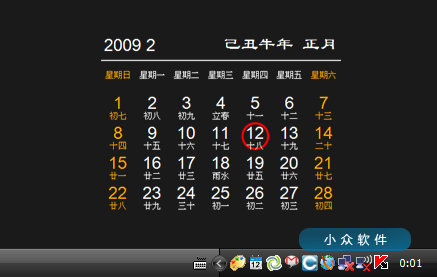
壁纸月历 比较有特色的地方是直接将月历添加在当前壁纸上,不常驻内存,仅仅每次开机检查当天日期,在更新后自动退出程序。这样,桌面上的月历,每天都会突出显示当天。
设置内可自定义字体以及颜色,配合桌面,更显美观。
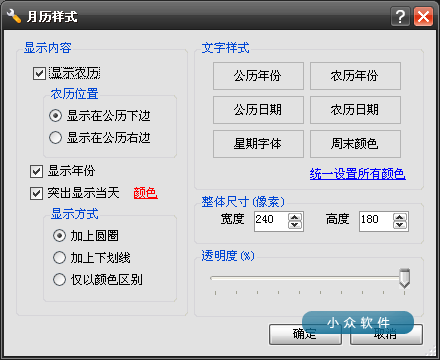
壁纸月历 需要 .Net 配合,很多同学又会抗议 .Net,没关系,作者准备了一款无需 .Net 的版本,不过体积增加了很多倍,2.94Mb vs 12.6Mb
对壁纸月历有两个建议:
1. 系统托盘内无法右键进入设置选项,那么留在托盘无意义。
2. 如果能显示天气就更棒了。
附作者提供的效果图预览:
![壁纸月历 - 给你的桌面添加月历[.Net] 1](https://static2.appinn.com/images/img1/yupoo/jdvip/692006f7c604/medium.jpg "壁纸月历 - 给你的桌面添加月历[.Net] 3")
![壁纸月历 - 给你的桌面添加月历[.Net] 2](https://static2.appinn.com/images/img1/yupoo/jdvip/154706f7c602/medium.jpg "壁纸月历 - 给你的桌面添加月历[.Net] 4")


呃。。为什么那么反感.net啊? 我认为有了它的支持,还是挺方便的啊。。呵呵。。
沙发先
@Kaka, 呃。。图像抵制复制错了,原谅一下哈。。
@Kaka, 呃。。又显示出来了,怪异。。
以下無關問題.
一直使用30inch的屏幕.雖然工作空間很大,但每次PageUP/Down都會滾好遠,寫代碼或者處理數據庫的時候都挺麻煩的.
請教一下有沒有能更改PageUp/Down為半屏的軟體或方法?
@不想注冊又想提問, 没见过,不过滚轮滚动的行数可以在控制面板里面修改。
@sfufoet, 不是滾輪(因為根本就不用滑鼠…),是指鍵盤上的PageUP和PageDown兩鍵.
两天没关机的话岂不是显示不了当天了
@typeandrun, 重新启动软件就行了。
7×24开机的掩面跑开…
不过这个软件的想法蛮不错的…
赞同!
一直用雪狐桌面精灵。
我喜欢这个小软件。
@sfufoet, 绿色免安装版有没?
软件本身就是绿色免安装的。而且同时拥有“需要.net的版本”和“不需要.net的版本”。
试用了一下,在Win7中实际效果不怎么样…一点都不精致,字体边缘看起来怪异…放弃了
默认设置是按Xp的环境设置的,如果不喜欢,可以自己设置,软件提供了丰富的设置项。
@追梦人, 你太勤劳了。。。。
雪狐桌面精灵一直有这功能,还有更多其他功能,比这个强啊
@火星的森林, 雪狐桌面精灵是很强大,但是它是必须一直运行的。而这款软件的优点在于它仅仅需要在开机的时候更新一下壁纸……
@追梦人,同意,我现在也在用这个,非常方便!
感觉使用了桌面不好看了~~~~
月历的样式有丰富的设置功能,可以发挥自己的创造力,打造最适合当前壁纸的月历!
飞雪桌面日历就很好很好啊
下来玩玩…谢了…
不客气!欢迎到我的博客交流。http://baijing-no.11.blog.163.com/
感谢大家的支持,我会虚心听取所有评论。
@追梦人,
绿色的,非常喜欢
我一直想要这样的功能
提5点建议
1、星期这里,能不能更个性一点
比如是用 星期一、或者 周一,或者 直接就是 一
顺序上可以自己选择 按照日、一、……六 或者 一、二、六、日
2、发现启动项是用的 HKEY_LOCAL_MACHINE\Software\Microsoft\Windows\CurrentVersion\Run
这类个性化的东西,最好加个选项可以选择放在
HKEY_CURRENT_USER\Software\Microsoft\Windows\CurrentVersion\Run 里面
适用于当前用户
适用于本机用户
这样两个选择,默认当前用户
3、小众建议增加 天气
我建议再提供一个网络对时功能,可选择使用或者关闭
适用于那些一开机就挂上网络的人
这功能加上去应该是比较简单的,不过手头的几款对时软件都没有自动退出功能,太操蛋了
有一款很小的能自动退,但是会使用夏令时。。。郁闷
4、还可以增加“特殊日子”提醒功能
比如春节、情人节、母亲节之类的通用的
也可以设置 自己和亲友 的生日等等
醒目方式可选择,可以是 日期 高亮,或者 另加一行,类似
“今天是 情人节,xxxxx”。
“今天是 xxx 的生日,你是否已经准备了礼物?”
祝福语的风格可选择,自己编辑的最优先
5、第一次运行的速度似乎有点慢,其实可以不使用右下系统栏图标
直接弹出设置框,这样应该可以使得程序简化,提示可以写在设置框内
对于这样一款绿色软件来说,简单大方就好,不需要太花哨的东西
为避免多个的时候可能会导致的混乱,最好增加 本程序只运行一个 的检测
另外,本人是坚决的.net反对者,绿色软件簇拥,一定要保持下去
@hyknife, 谢谢您的建议,我会尽快改进后出新版本的!
@追梦人,
再提个意见
主文件:壁纸月历.exe
设置文件:MonthCander.sdt
最好统一文件主名,便于管理
我把 壁纸月历.exe 改成 MonthCander.exe
发现 注册表里的注册内容还是 壁纸月历
这应该算是bug了
建议可以随便修改exe文件名,设置文件主名和exe文件相同
就和 NirSoft 公司的小软件那样
@hyknife, “注册表里的注册内容还是 壁纸月历”是问题实在是因为要同时兼容2种版本造成的;至于设置文件MonthCander.sdt,根据你上面“适用于当前用户、适用于本机用户”的建议,我打算把它放在“我的文档”里面,你觉得怎么样?
另外,我怎么直接联系你?
非常好,感觉超好用
基于.net的压缩后居然不到300k
看来windows还是装下.net好了
好吧,是想试一下的来着,但是
不小心ctrl-enter了
************** Exception Text **************
System.NullReferenceException: Object reference not set to an instance of an object.
at WallPaperMonthlyCalendar.x210ff09a2516b1a7.x97229a3464899c2a(Object xe0292b9ed559da7d, EventArgs xfbf34718e704c6bc)
at System.Windows.Forms.Control.OnResize(EventArgs e)
at System.Windows.Forms.Form.OnResize(EventArgs e)
at System.Windows.Forms.Control.OnSizeChanged(EventArgs e)
at System.Windows.Forms.Control.UpdateBounds(Int32 x, Int32 y, Int32 width, Int32 height, Int32 clientWidth, Int32 clientHeight)
at System.Windows.Forms.Control.UpdateBounds(Int32 x, Int32 y, Int32 width, Int32 height)
at System.Windows.Forms.Control.SetBoundsCore(Int32 x, Int32 y, Int32 width, Int32 height, BoundsSpecified specified)
at System.Windows.Forms.Form.SetBoundsCore(Int32 x, Int32 y, Int32 width, Int32 height, BoundsSpecified specified)
at System.Windows.Forms.Control.ScaleControl(SizeF factor, BoundsSpecified specified)
at System.Windows.Forms.ScrollableControl.ScaleControl(SizeF factor, BoundsSpecified specified)
at System.Windows.Forms.Form.ScaleControl(SizeF factor, BoundsSpecified specified)
at System.Windows.Forms.Control.ScaleControl(SizeF includedFactor, SizeF excludedFactor, Control requestingControl)
at System.Windows.Forms.ContainerControl.Scale(SizeF includedFactor, SizeF excludedFactor, Control requestingControl)
at System.Windows.Forms.ContainerControl.PerformAutoScale(Boolean includedBounds, Boolean excludedBounds)
at System.Windows.Forms.ContainerControl.PerformNeededAutoScaleOnLayout()
at System.Windows.Forms.ContainerControl.OnLayoutResuming(Boolean performLayout)
at System.Windows.Forms.Control.ResumeLayout(Boolean performLayout)
at WallPaperMonthlyCalendar.x210ff09a2516b1a7.x85601834555fb7d5()
at WallPaperMonthlyCalendar.x210ff09a2516b1a7..ctor(String[] args)
at WallPaperMonthlyCalendar.x4e0ff94739f13eb5.x841f09d9a22a8e7a(Object xe0292b9ed559da7d, EventArgs xfbf34718e704c6bc)
at System.Windows.Forms.Form.OnShown(EventArgs e)
at System.Windows.Forms.Form.CallShownEvent()
at System.Windows.Forms.Control.InvokeMarshaledCallbackDo(ThreadMethodEntry tme)
at System.Windows.Forms.Control.InvokeMarshaledCallbackHelper(Object obj)
at System.Threading.ExecutionContext.runTryCode(Object userData)
at System.Runtime.CompilerServices.RuntimeHelpers.ExecuteCodeWithGuaranteedCleanup(TryCode code, CleanupCode backoutCode, Object userData)
at System.Threading.ExecutionContext.RunInternal(ExecutionContext executionContext, ContextCallback callback, Object state)
at System.Threading.ExecutionContext.Run(ExecutionContext executionContext, ContextCallback callback, Object state)
at System.Windows.Forms.Control.InvokeMarshaledCallback(ThreadMethodEntry tme)
at System.Windows.Forms.Control.InvokeMarshaledCallbacks()
@Oakley, 我只是在Vista Ultimate简体中文版下测试过的,没有问题。请下载使用“无需 .Net 版本 12.2M”看看。我也再检查一下。
@Oakley, 问题已经解决,请到我的博客下载最新版本的程序。
http://baijing-no.11.blog.163.com/blog/static/37892212008102693728187/
@追梦人, 今天才看到有更新,下载,搞定,赞,像我这种不需要定时提醒的最适合了。
这种桌面日历形式很不错,往更多可定制化的方向发展就更好了,像是可以自定义皮肤文字之类、显示两个月的月历;
如果机器不重新启动的话,在0点会更新?需要用schedule设定?
很喜欢,吃了睡睡了吃,都不知道人间是几月几号星期几啦
我还以为是rainlendar..界面几乎一模一样…
呵呵,所有的月历都是这个样子。
蛮好看的,飞雪日历很好用
有搞头,收了。
.net版本,“发生了无法处理的异常。” “未将对象引用设置到对象的实例。。”
—————————详细信息————————
有关调用实时(JIT)调试而不是此对话框的详细信息,
请参见此消息的结尾。
************** 异常文本 **************
System.NullReferenceException: 未将对象引用设置到对象的实例。
在 WallPaperMonthlyCalendar.x210ff09a2516b1a7.x97229a3464899c2a(Object xe0292b9ed559da7d, EventArgs xfbf34718e704c6bc)
在 System.Windows.Forms.Control.OnResize(EventArgs e)
在 System.Windows.Forms.Form.OnResize(EventArgs e)
在 System.Windows.Forms.Control.OnSizeChanged(EventArgs e)
在 System.Windows.Forms.Control.UpdateBounds(Int32 x, Int32 y, Int32 width, Int32 height, Int32 clientWidth, Int32 clientHeight)
在 System.Windows.Forms.Control.UpdateBounds(Int32 x, Int32 y, Int32 width, Int32 height)
在 System.Windows.Forms.Control.SetBoundsCore(Int32 x, Int32 y, Int32 width, Int32 height, BoundsSpecified specified)
在 System.Windows.Forms.Form.SetBoundsCore(Int32 x, Int32 y, Int32 width, Int32 height, BoundsSpecified specified)
在 System.Windows.Forms.Control.ScaleControl(SizeF factor, BoundsSpecified specified)
在 System.Windows.Forms.ScrollableControl.ScaleControl(SizeF factor, BoundsSpecified specified)
在 System.Windows.Forms.Form.ScaleControl(SizeF factor, BoundsSpecified specified)
在 System.Windows.Forms.Control.ScaleControl(SizeF includedFactor, SizeF excludedFactor, Control requestingControl)
在 System.Windows.Forms.ContainerControl.Scale(SizeF includedFactor, SizeF excludedFactor, Control requestingControl)
在 System.Windows.Forms.ContainerControl.PerformAutoScale(Boolean includedBounds, Boolean excludedBounds)
在 System.Windows.Forms.ContainerControl.PerformNeededAutoScaleOnLayout()
在 System.Windows.Forms.ContainerControl.OnLayoutResuming(Boolean performLayout)
在 System.Windows.Forms.Control.ResumeLayout(Boolean performLayout)
在 WallPaperMonthlyCalendar.x210ff09a2516b1a7.x85601834555fb7d5()
在 WallPaperMonthlyCalendar.x210ff09a2516b1a7..ctor(String[] args)
在 WallPaperMonthlyCalendar.x4e0ff94739f13eb5.x841f09d9a22a8e7a(Object xe0292b9ed559da7d, EventArgs xfbf34718e704c6bc)
在 System.Windows.Forms.Form.OnShown(EventArgs e)
在 System.Windows.Forms.Form.CallShownEvent()
在 System.Windows.Forms.Control.InvokeMarshaledCallbackDo(ThreadMethodEntry tme)
在 System.Windows.Forms.Control.InvokeMarshaledCallbackHelper(Object obj)
在 System.Threading.ExecutionContext.runTryCode(Object userData)
在 System.Runtime.CompilerServices.RuntimeHelpers.ExecuteCodeWithGuaranteedCleanup(TryCode code, CleanupCode backoutCode, Object userData)
在 System.Threading.ExecutionContext.RunInternal(ExecutionContext executionContext, ContextCallback callback, Object state)
在 System.Threading.ExecutionContext.Run(ExecutionContext executionContext, ContextCallback callback, Object state)
在 System.Windows.Forms.Control.InvokeMarshaledCallback(ThreadMethodEntry tme)
在 System.Windows.Forms.Control.InvokeMarshaledCallbacks()
************** 已加载的程序集 **************
mscorlib
程序集版本: 2.0.0.0
Win32 版本: 2.0.50727.1434 (REDBITS.050727-1400)
基本代码: file:///C:/Windows/Microsoft.NET/Framework/v2.0.50727/mscorlib.dll
—————————————-
壁纸月历
程序集版本: 1.0.0.0
Win32 版本: 1.0.0.0
基本代码: file:///D:/Program%20Files/壁纸月历.exe
—————————————-
System.Windows.Forms
程序集版本: 2.0.0.0
Win32 版本: 2.0.50727.1434 (REDBITS.050727-1400)
基本代码: file:///C:/Windows/assembly/GAC_MSIL/System.Windows.Forms/2.0.0.0__b77a5c561934e089/System.Windows.Forms.dll
—————————————-
System
程序集版本: 2.0.0.0
Win32 版本: 2.0.50727.1434 (REDBITS.050727-1400)
基本代码: file:///C:/Windows/assembly/GAC_MSIL/System/2.0.0.0__b77a5c561934e089/System.dll
—————————————-
System.Drawing
程序集版本: 2.0.0.0
Win32 版本: 2.0.50727.1434 (REDBITS.050727-1400)
基本代码: file:///C:/Windows/assembly/GAC_MSIL/System.Drawing/2.0.0.0__b03f5f7f11d50a3a/System.Drawing.dll
—————————————-
mscorlib.resources
程序集版本: 2.0.0.0
Win32 版本: 2.0.50727.1434 (REDBITS.050727-1400)
基本代码: file:///C:/Windows/Microsoft.NET/Framework/v2.0.50727/mscorlib.dll
—————————————-
System.Windows.Forms.resources
程序集版本: 2.0.0.0
Win32 版本: 2.0.50727.1434 (REDBITS.050727-1400)
基本代码: file:///C:/Windows/assembly/GAC_MSIL/System.Windows.Forms.resources/2.0.0.0_zh-CHS_b77a5c561934e089/System.Windows.Forms.resources.dll
—————————————-
************** JIT 调试 **************
要启用实时(JIT)调试,
该应用程序或计算机的 .config 文件(machine.config)的 system.windows.forms 节中必须设置
jitDebugging 值。
编译应用程序时还必须启用
调试。
例如:
启用 JIT 调试后,任何无法处理的异常
都将被发送到在此计算机上注册的 JIT 调试器,
而不是由此对话框处理。
补充一下,Vista系统 ,用自带的.Net 2.0。
我只是在Vista Ultimate简体中文版下测试过的,没有问题。请下载使用“无需 .Net 版本 12.2M”看看。
问题已经解决,请到我的博客下载最新版本的程序。
http://baijing-no.11.blog.163.com/blog/static/37892212008102693728187/
Brsbox在fx下能下载? 我是到作者博客去下的那个无需.net的..
不支持Vista吗?我下载了两个版本都不能使用。
@Forrest, 支持Vista的,而且用“(需要 .Net 版本 2.94MB)”就可以了。
—————————
错误
—————————
Your application has encountered an error: 0x80070002, with following description:
Message: 系统找不到指定的文件。
Description: Could not load file or assembly ‘壁纸月历, Version=1.0.0.0, Culture=neutral, PublicKeyToken=null’ or one of its dependencies. 系统找不到指定的文件。
Source: mscorlib
HelpFile:
Please contact the publisher of this application for more information.
—————————
确定
—————————
囧
@东楮岛, 你的系统没有安装.net FrameWork,请下载使用“无需 .Net 版本 12.2M”。
可以看看GTD Life的《outlook插件之Outlook on the Desktop使用》
http://www.gtdlife.cn/2008/852/outlook-plugin-usage-of-outlook-on-the-desktop/
这两个是同一个软件吧?只不过一个不需要.NET,一个需要吧?
@skystar, 就是这样的。
啥?我没看错吧?压缩前近3M,压缩后250多K?注水的?
@skystar, 不是压缩,是2个运行在不同平台下的版本。
很好的软件,谢谢!
没有下载使用,那个不需要 .net 的,是不是你 Mono 编译的?
没有下载使用,那个不需要 .net 的,是不是用 Mono 编译的?
@李二嫂的猪, 不是的。
无需 .Net 版本 12.2M不能正常运行。
信息如下:
See the end of this message for details on invoking
just-in-time (JIT) debugging instead of this dialog box.
************** Exception Text **************
System.NullReferenceException: Object reference not set to an instance of an object.
at WallPaperMonthlyCalendar.x210ff09a2516b1a7.x97229a3464899c2a(Object xe0292b9ed559da7d, EventArgs xfbf34718e704c6bc)
at System.Windows.Forms.Control.OnResize(EventArgs e)
at System.Windows.Forms.Form.OnResize(EventArgs e)
at System.Windows.Forms.Control.OnSizeChanged(EventArgs e)
at System.Windows.Forms.Control.UpdateBounds(Int32 x, Int32 y, Int32 width, Int32 height, Int32 clientWidth, Int32 clientHeight)
at System.Windows.Forms.Control.UpdateBounds(Int32 x, Int32 y, Int32 width, Int32 height)
at System.Windows.Forms.Control.SetBoundsCore(Int32 x, Int32 y, Int32 width, Int32 height, BoundsSpecified specified)
at System.Windows.Forms.Form.SetBoundsCore(Int32 x, Int32 y, Int32 width, Int32 height, BoundsSpecified specified)
at System.Windows.Forms.Control.ScaleControl(SizeF factor, BoundsSpecified specified)
at System.Windows.Forms.ScrollableControl.ScaleControl(SizeF factor, BoundsSpecified specified)
at System.Windows.Forms.Form.ScaleControl(SizeF factor, BoundsSpecified specified)
at System.Windows.Forms.Control.ScaleControl(SizeF includedFactor, SizeF excludedFactor, Control requestingControl)
at System.Windows.Forms.ContainerControl.Scale(SizeF includedFactor, SizeF excludedFactor, Control requestingControl)
at System.Windows.Forms.ContainerControl.PerformAutoScale(Boolean includedBounds, Boolean excludedBounds)
at System.Windows.Forms.ContainerControl.PerformNeededAutoScaleOnLayout()
at System.Windows.Forms.ContainerControl.OnLayoutResuming(Boolean performLayout)
at System.Windows.Forms.Control.ResumeLayout(Boolean performLayout)
at WallPaperMonthlyCalendar.x210ff09a2516b1a7.x85601834555fb7d5()
at WallPaperMonthlyCalendar.x210ff09a2516b1a7..ctor(String[] args)
at WallPaperMonthlyCalendar.x4e0ff94739f13eb5.x841f09d9a22a8e7a(Object xe0292b9ed559da7d, EventArgs xfbf34718e704c6bc)
at System.Windows.Forms.Form.OnShown(EventArgs e)
at System.Windows.Forms.Form.CallShownEvent()
at System.Windows.Forms.Control.InvokeMarshaledCallbackDo(ThreadMethodEntry tme)
at System.Windows.Forms.Control.InvokeMarshaledCallbackHelper(Object obj)
at System.Threading.ExecutionContext.runTryCode(Object userData)
at System.Runtime.CompilerServices.RuntimeHelpers.ExecuteCodeWithGuaranteedCleanup(TryCode code, CleanupCode backoutCode, Object userData)
at System.Threading.ExecutionContext.RunInternal(ExecutionContext executionContext, ContextCallback callback, Object state)
at System.Threading.ExecutionContext.Run(ExecutionContext executionContext, ContextCallback callback, Object state)
at System.Windows.Forms.Control.InvokeMarshaledCallback(ThreadMethodEntry tme)
at System.Windows.Forms.Control.InvokeMarshaledCallbacks()
************** Loaded Assemblies **************
mscorlib
Assembly Version: 2.0.0.0
Win32 Version: 2.0.50727.42 (RTM.050727-4200)
CodeBase: file:///x:/vmroot/v2.0.50727/mscorlib.dll
—————————————-
壁纸月历
Assembly Version: 1.0.0.0
Win32 Version: 1.0.0.0
CodeBase: file:///D:/theapp.exe
—————————————-
System.Windows.Forms
Assembly Version: 2.0.0.0
Win32 Version: 2.0.50727.42 (RTM.050727-4200)
CodeBase: file:///C:/WINDOWS/assembly/GAC_MSIL/System.Windows.Forms/2.0.0.0__b77a5c561934e089/System.Windows.Forms.dll
—————————————-
System
Assembly Version: 2.0.0.0
Win32 Version: 2.0.50727.42 (RTM.050727-4200)
CodeBase: file:///C:/WINDOWS/assembly/GAC_MSIL/System/2.0.0.0__b77a5c561934e089/System.dll
—————————————-
System.Drawing
Assembly Version: 2.0.0.0
Win32 Version: 2.0.50727.42 (RTM.050727-4200)
CodeBase: file:///C:/WINDOWS/assembly/GAC_MSIL/System.Drawing/2.0.0.0__b03f5f7f11d50a3a/System.Drawing.dll
—————————————-
System.Configuration
Assembly Version: 2.0.0.0
Win32 Version: 2.0.50727.42 (RTM.050727-4200)
CodeBase: file:///C:/WINDOWS/assembly/GAC_MSIL/System.Configuration/2.0.0.0__b03f5f7f11d50a3a/System.Configuration.dll
—————————————-
System.Xml
Assembly Version: 2.0.0.0
Win32 Version: 2.0.50727.42 (RTM.050727-4200)
CodeBase: file:///C:/WINDOWS/assembly/GAC_MSIL/System.Xml/2.0.0.0__b77a5c561934e089/System.Xml.dll
—————————————-
Accessibility
Assembly Version: 2.0.0.0
Win32 Version: 2.0.50727.42 (RTM.050727-4200)
CodeBase: file:///C:/WINDOWS/assembly/GAC_MSIL/Accessibility/2.0.0.0__b03f5f7f11d50a3a/Accessibility.dll
—————————————-
************** JIT Debugging **************
To enable just-in-time (JIT) debugging, the .config file for this
application or computer (machine.config) must have the
jitDebugging value set in the system.windows.forms section.
The application must also be compiled with debugging
enabled.
For example:
When JIT debugging is enabled, any unhandled exception
will be sent to the JIT debugger registered on the computer
rather than be handled by this dialog box.
@咱位, 请问你是什么操作系统?上面用2003的朋友也是这个问题。
@追梦人, 我的XP同样有此问题。
@咱位, 问题已经解决,请到我的博客下载最新版本的程序。
http://baijing-no.11.blog.163.com/blog/static/37892212008102693728187/
用了,很好,很喜欢。而且和当前的地址也很配。谢谢啦。:)
我很感兴趣的是倒数第二张图上右下角的那个钟表是什么小软件
@Kevin, 那我的另外一个小软件,模仿Viata侧边栏时钟,还可以自定义界面的。要的话留下你的邮箱,我可以发给你。
@追梦人,
呵呵,喜欢,发来试试,谢谢先,邮箱:[email protected]
发现个问题,如果没用壁纸退出后不显示了,囧~~~
@Z, 这个问题已经解决了。
See the end of this message for details on invoking
just-in-time (JIT) debugging instead of this dialog box.
************** Exception Text **************
System.NullReferenceException: Object reference not set to an instance of an object.
at WallPaperMonthlyCalendar.x210ff09a2516b1a7.x97229a3464899c2a(Object xe0292b9ed559da7d, EventArgs xfbf34718e704c6bc)
at System.Windows.Forms.Control.OnResize(EventArgs e)
at System.Windows.Forms.Form.OnResize(EventArgs e)
at System.Windows.Forms.Control.OnSizeChanged(EventArgs e)
at System.Windows.Forms.Control.UpdateBounds(Int32 x, Int32 y, Int32 width, Int32 height, Int32 clientWidth, Int32 clientHeight)
at System.Windows.Forms.Control.UpdateBounds(Int32 x, Int32 y, Int32 width, Int32 height)
at System.Windows.Forms.Control.SetBoundsCore(Int32 x, Int32 y, Int32 width, Int32 height, BoundsSpecified specified)
at System.Windows.Forms.Form.SetBoundsCore(Int32 x, Int32 y, Int32 width, Int32 height, BoundsSpecified specified)
at System.Windows.Forms.Control.ScaleControl(SizeF factor, BoundsSpecified specified)
at System.Windows.Forms.ScrollableControl.ScaleControl(SizeF factor, BoundsSpecified specified)
at System.Windows.Forms.Form.ScaleControl(SizeF factor, BoundsSpecified specified)
at System.Windows.Forms.Control.ScaleControl(SizeF includedFactor, SizeF excludedFactor, Control requestingControl)
at System.Windows.Forms.ContainerControl.Scale(SizeF includedFactor, SizeF excludedFactor, Control requestingControl)
at System.Windows.Forms.ContainerControl.PerformAutoScale(Boolean includedBounds, Boolean excludedBounds)
at System.Windows.Forms.ContainerControl.PerformNeededAutoScaleOnLayout()
at System.Windows.Forms.ContainerControl.OnLayoutResuming(Boolean performLayout)
at System.Windows.Forms.Control.ResumeLayout(Boolean performLayout)
at WallPaperMonthlyCalendar.x210ff09a2516b1a7.x85601834555fb7d5()
at WallPaperMonthlyCalendar.x210ff09a2516b1a7..ctor(String[] args)
at WallPaperMonthlyCalendar.x4e0ff94739f13eb5.x841f09d9a22a8e7a(Object xe0292b9ed559da7d, EventArgs xfbf34718e704c6bc)
at System.Windows.Forms.Form.OnShown(EventArgs e)
at System.Windows.Forms.Form.CallShownEvent()
at System.Windows.Forms.Control.InvokeMarshaledCallbackDo(ThreadMethodEntry tme)
at System.Windows.Forms.Control.InvokeMarshaledCallbackHelper(Object obj)
at System.Threading.ExecutionContext.runTryCode(Object userData)
at System.Runtime.CompilerServices.RuntimeHelpers.ExecuteCodeWithGuaranteedCleanup(TryCode code, CleanupCode backoutCode, Object userData)
at System.Threading.ExecutionContext.RunInternal(ExecutionContext executionContext, ContextCallback callback, Object state)
at System.Threading.ExecutionContext.Run(ExecutionContext executionContext, ContextCallback callback, Object state)
at System.Windows.Forms.Control.InvokeMarshaledCallback(ThreadMethodEntry tme)
at System.Windows.Forms.Control.InvokeMarshaledCallbacks()
************** Loaded Assemblies **************
mscorlib
Assembly Version: 2.0.0.0
Win32 Version: 2.0.50727.1433 (REDBITS.050727-1400)
CodeBase: file:///C:/WINDOWS/Microsoft.NET/Framework/v2.0.50727/mscorlib.dll
—————————————-
壁纸月历
Assembly Version: 1.0.0.0
Win32 Version: 1.0.0.0
CodeBase: file:///C:/TotalCMD/Tools/desktop%20wallpaper/壁纸月历.exe
—————————————-
System.Windows.Forms
Assembly Version: 2.0.0.0
Win32 Version: 2.0.50727.1433 (REDBITS.050727-1400)
CodeBase: file:///C:/WINDOWS/assembly/GAC_MSIL/System.Windows.Forms/2.0.0.0__b77a5c561934e089/System.Windows.Forms.dll
—————————————-
System
Assembly Version: 2.0.0.0
Win32 Version: 2.0.50727.1433 (REDBITS.050727-1400)
CodeBase: file:///C:/WINDOWS/assembly/GAC_MSIL/System/2.0.0.0__b77a5c561934e089/System.dll
—————————————-
System.Drawing
Assembly Version: 2.0.0.0
Win32 Version: 2.0.50727.1433 (REDBITS.050727-1400)
CodeBase: file:///C:/WINDOWS/assembly/GAC_MSIL/System.Drawing/2.0.0.0__b03f5f7f11d50a3a/System.Drawing.dll
—————————————-
System.Configuration
Assembly Version: 2.0.0.0
Win32 Version: 2.0.50727.1433 (REDBITS.050727-1400)
CodeBase: file:///C:/WINDOWS/assembly/GAC_MSIL/System.Configuration/2.0.0.0__b03f5f7f11d50a3a/System.Configuration.dll
—————————————-
System.Xml
Assembly Version: 2.0.0.0
Win32 Version: 2.0.50727.1433 (REDBITS.050727-1400)
CodeBase: file:///C:/WINDOWS/assembly/GAC_MSIL/System.Xml/2.0.0.0__b77a5c561934e089/System.Xml.dll
—————————————-
Accessibility
Assembly Version: 2.0.0.0
Win32 Version: 2.0.50727.1433 (REDBITS.050727-1400)
CodeBase: file:///C:/WINDOWS/assembly/GAC_MSIL/Accessibility/2.0.0.0__b03f5f7f11d50a3a/Accessibility.dll
—————————————-
************** JIT Debugging **************
To enable just-in-time (JIT) debugging, the .config file for this
application or computer (machine.config) must have the
jitDebugging value set in the system.windows.forms section.
The application must also be compiled with debugging
enabled.
For example:
@chrome, 问题已经解决,请到我的博客下载最新版本的程序。
http://baijing-no.11.blog.163.com/blog/static/37892212008102693728187/
包含.NET的版本,EXE程序全名为“壁纸月历.net.exe”
而注册表中启动项的路径是”…壁纸月历.exe“
结果导致启动项无效,.NET版无法在开机后自动更新日期
这种低级的BUG,实在不该犯
@oscar, “EXE程序全名为“壁纸月历.net.exe””——程序名称就是“壁纸月历.exe”。是你自己改成“壁纸月历.net.exe”的?
@追梦人,
我从brsbox上DOWN下来就是这个结果,以下为原始RAR文档内的截图
难道只有我一个人DOWN到的文件这么蹊跷?!
还是我DOWN得太早,之后作者进行了修正?
http://img118.imageshack.us/img118/115/image00000mj8.jpg
@oscar, 看到你提供的截图了!这可能是小众的编辑为了方便区分改成这样的,因为我的原始设计的两个版本都叫“壁纸月历.exe”。另外,这个软件在小众发布后,根据用户发现的bug我又修改了一下。小众这里还没有更新,请到我的博客下载最新版本:http://baijing-no.11.blog.163.com/。
用不了哦。。。
@banana_, 问题已经解决,请到我的博客下载最新版本的程序。
http://baijing-no.11.blog.163.com/blog/static/37892212008102693728187/
对于机器7X24小时开机的用户,可以把这个程序的启停指令,设定到“计划任务”中。跨日的时候,就能够对日历进行更新了。
非常喜欢,已经推荐给了很多朋友试用
这么干净的软件,用了!
提个建议,能不能在最左边增加一列显示周数,工作计划都是按照第几到第几周订的,每次都搞不清当前的周数。
多谢!
@timew, 谢谢你的建议。只是我觉得,一个月只有4、5周,有必要再作这个标识吗?
@timew, 你的意思是,显示“今年的第几周”?
@追梦人, 我想timew说的是这个意思。我也觉得这个功能很有用。
更新到今天后,以前标记的圈依旧存在,感觉比较乱,能不能改成只是在当天的日期上加上圈圈啊?
@mea07, 本来就只是“只是在当天的日期上加上圈圈”。我估计你肯定是设置后没有退出。请到这里参考正确的使用方法:http://baijing-no.11.blog.163.com/blog/static/37892212008102693728187/
@追梦人, 哦,好象是我设置了两次的原因
我自己挺喜欢这软件的,功能要求不用太高,实用就好,雪狐的我也用,但说真的不如这个小巧方便,照这样的软件也找了蛮久的,这个是最合适我自己的。
另外发现非.NET版本与之前推荐的FANCES桌面图标整理软件似乎是有冲突,开机后就会报告INTERNET错误,壁纸也无法正常显示,换成.NET版本之后一切正常了,虽然我喜欢绿色软件,但只要用起来方便,倒也不是太计较这个了。呵呵!
你博客,不能下载,上
@蓝色, 我试过了,能下载的。请留下你的邮箱,我发给你。
针对大家提出的各种建议,《壁纸月历2.0》已经出炉了,请大家到这里下载最新的2.0版。
http://baijing-no.11.blog.163.com/blog/static/37892212008102693728187/
注:2.0版跟以前的版本不兼容,若以前使用过老版本,需要先“不再显示月历”再使用2.0版。
每次启动后都要再点一次设置!!!可不可以只要设置一次就OK了!!
@B.Bo, 不需要再点一次啊,一次设置就可以了
能让日历在到点儿的时候自动更新吗?
用这个月历是因为它功能单一,就是显示今天是几号,星期几,有农历。其他的事情都会用专门的软件来做。 想问下作者能不能在开发的过程中,一直保留一个功能最单纯的版本(就是只提供1.0版功能的版本)? 个人意见,仅供参考。
@ehaagwlke, 可以通过Windows自带的“任务计划”功能实现。
理想的状态是:功能全面、使用简单。谢谢你的建议,我会继续努力的!
我下载的是不用.NET的,结果运行后一直常驻内存,而且还是100多M,怎么回事?
@momo, 运行后马上设置,设置完了马上退出……一定要退出,你没有退出?
请到我的博客下载最新版本
http://baijing-no.11.blog.163.com/blog/static/37892212008102693728187/
怎么卸载呢?
@m600i, 删除就好了
@m600i, 进入设置界面,选择“不再使用月历”。退出后直接删除程序,不会在系统留下任何垃圾。
看看我的头像
@追梦人, 得等等,头像有缓存
@追梦人, 现在看到了,哈哈!
为什么月历不能自动更新。
@小Li, 自动更新需要2个条件:1、设置了“开机自动更新”;2、启动系统的时候或启动软件的时候会触发。
一周的开始可以改成周一么?
哦 2.0已经解决了
我原来用过这个。
CHKen Tray Clock
还行。
不错,有款桌面精灵的软件貌似也差不多。。。
怎么每次开机都要重起软件才能显示当天的日期啊
这个不错吗
要是可以添加记事功能就好了。大家有没有好的软件推荐?
怎么下载不了啊,可以发给我么?