2008.12.15 by scavin

HttpWatch Basic Edition – blog 访问速度诊断工具

50

HttpWatch Basic Edition 是一个可以帮你判断博客访问速度的瓶颈在哪里的 IE/Firefox 插件。via
HttpWatch Basic Edition   blog 访问速度诊断工具[图] | 小众软件 > net

不知道有多少人会觉得自己的 blog 访问速度很快,或者说很满意?而除了一国两制的线路原因外,还有很多其它原因,比如边栏工具,比如图片链接,比如插件等等。

HttpWatch Basic Edition 为免费版本,更强大的 Professional Edition 是要钱的,况且我们也用不到那么多功能。

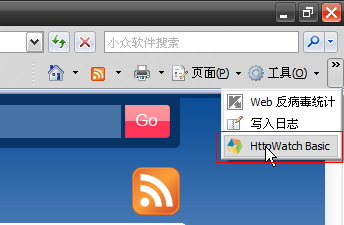
首先安装 HttpWatch Basic Edition,会把自己添加进 IE 里,如果系统内有 Firefox,会提示你是否要安装 Firefox 版本。

打开方式:
HttpWatch Basic Edition   blog 访问速度诊断工具[图] | 小众软件 > net
IE 浏览器

HttpWatch Basic Edition   blog 访问速度诊断工具[图] | 小众软件 > net
Firefox 浏览器

打开 HttpWatch Basic Edition 后,先别急着诊断,选择 Tools > Clear Cache and All Cookie (Alt + Del) 清空浏览器缓存Cookie,因为我们要模仿新访客第一次来网站的情况。

清空完毕,这个时候不要打开任何网页,点击 Record 按钮,输入网址,开始载入。

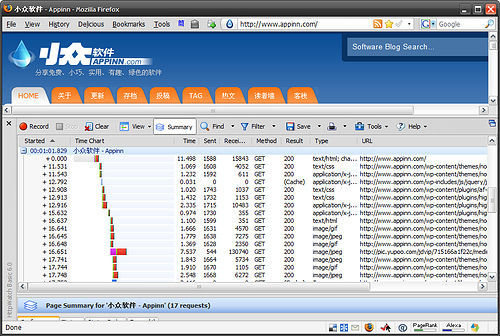
很快,就会得到如第一幅截图的报表,里面有浏览器访问网页每一步的记录,从中,你就可以看到哪一步花费的时间长,我们就可以针对它进行优化了。

比如小众发现 Highslide Integration 插件严重拖慢速度,虽然此插件对图片的浏览很华丽,但是太过于拖慢速度,停掉。

我记得有个网站也可以实现此功能,但不记得名字了。

软件比较大,8M,仅提供 brsbox官方下载

25 Comments:

  1. 1. sogoo said on: 2008/12/15 07:50

    我这显示你的blog,chrome下正常;
    IE下,背景白板,排版和元素错乱,css出错?
    now…
    需要诊断一下下…

    回复

    Gavatar | 小众软件

    @sogoo, 顶~顺便占个大腿~

    回复

    Gavatar | 小众软件

    @李二嫂的猪, 哦也,二级大腿

    armgod reply on 十二月 15th, 2008,10:33:

    Gavatar | 小众软件

    @armgod,一级大腿竟然不是你的。。。

    scavin reply on 十二月 15th, 2008,10:36:

    Gavatar | 小众软件

    沙发垮了

    09K reply on 十二月 15th, 2008,11:40:

    Gavatar | 小众软件

    @scavin,二猪对沙发党不忠,越界加入我党,我也木办法……

    armgod reply on 十二月 15th, 2008,11:45:

    李二嫂的猪 reply on 十二月 15th, 2008,07:53:

    Gavatar | 小众软件

    @sogoo, 我在别人电脑上用IE6也有问题的,首页正常,点开日志就没背景而且排版奇怪……

    回复

    armgod reply on 十二月 15th, 2008,11:51:

  2. 2. Enson said on: 2008/12/15 08:20

    板凳米人要吗?

    回复

    Gavatar | 小众软件

    @Enson, 要你给吗

    回复

    Gavatar | 小众软件

    @scavin, 你要我肯定会给你的

    Enson reply on 十二月 15th, 2008,12:31:

    scavin reply on 十二月 15th, 2008,10:36:

  3. 3. 火星蜥蜴 said on: 2008/12/15 08:50

    葱白青蛙和小众~~

    回复

    Gavatar | 小众软件

    @火星蜥蜴, 你在说什么

    回复

    scavin reply on 十二月 15th, 2008,09:18:

    Gavatar | 小众软件

    @火星蜥蜴, 刂众哈哈

    回复

    armgod reply on 十二月 15th, 2008,10:34:

  4. 4. Q.Henry said on: 2008/12/15 08:50

    这个功能的网站
    http://tools.pingdom.com/

    回复

    Gavatar | 小众软件

    @Q.Henry, 可以使用。

    回复

    phy reply on 一月 6th, 2009,18:35:

  5. 5. 猪头 said on: 2008/12/15 09:11

    这个貌似不错,有空试试看我的博客哪里慢

    回复

  6. 6. fafall said on: 2008/12/15 09:39

    没有破解版

    回复

    Gavatar | 小众软件

    @fafall, 此版本为免费版本。小众不提供破解

    回复

    scavin reply on 十二月 15th, 2008,09:41:

  7. 7. viperasi said on: 2008/12/15 09:48

    一直在用 开发网页也是必备的东西 = =

    回复

  8. 8. 莫莫 said on: 2008/12/15 09:52

    太大了,有没有绿色的呢?呵呵,我也记得有个网站是可以的。楼下的说下:

    回复

    Gavatar | 小众软件

    @莫莫, 是安装到浏览器里的插件,怎么都要安装的

    回复

    scavin reply on 十二月 15th, 2008,10:36:

  9. 9. 一株芦苇 said on: 2008/12/15 10:29

    从截图看到小众还真的是用picpick作截图,其实建议用faststone capture。
    单文件
    功能丰富(截图、初级编辑……换肤)
    ……

    回复

    Gavatar | 小众软件

    @一株芦苇, 相对于价值 $19.95 的 fc 来说,我更愿意用免费的 picpick

    回复

    scavin reply on 十二月 15th, 2008,10:35:

    Gavatar | 小众软件

    @一株芦苇, 另外,小众这里不建议使用破解软件,所以,我删去了你给出的下载链接

    回复

    scavin reply on 十二月 15th, 2008,10:35:

  10. 10. mybeky said on: 2008/12/15 10:51

    乍一看还以为是firebug的Network monitoring

    回复

    Gavatar | 小众软件

    @mybeky, 厄 我也这么认为。。。firebug好像更强大一点

    回复

    YuLei666 reply on 十二月 15th, 2008,11:53:

  11. 11. Izual_Yang said on: 2008/12/15 10:56

    我现在ie7下用的是httpwatch6的pro版。firefox下有httpfox基本够用了。话说现在的adblock plus已经能显示对象的子请求了(也就是flv的真实地址之类的)。

    回复

  12. 12. BuzunSen said on: 2008/12/15 11:52

    我在官方下载 那里下载,为什么nod32提示有病毒……
    这是日志:
    2008-12-15 11:52:25 HTTP 过滤器 文件 http://www.httpwatch.com/httpwatch.exe Win32/Adware.Cinmus 应用程序 连接中断 – 已隔离 MEIJIA\buzunsen 通过应用程序访问 web 时检测到威胁: F:\soft\Opera\opera.exe.

    回复

  13. 13. ytt said on: 2008/12/15 12:39

    我又来了。

    貌似这个用firefox + firebug还是可以实现的。。。

    回复

  14. 14. Elton Disney said on: 2008/12/15 13:48

    好东西哇~~

    回复

  15. 15. Senx said on: 2008/12/15 14:17

    ie用httpwatch,ff用firebug,倒是没发现httpwatch还有ff版的

    回复

  16. 16. Senx said on: 2008/12/15 14:20

    请教小众,从左数状态栏的第一个、第二个和第六个图标都是什么扩展?

    回复

    Gavatar | 小众软件

    @Senx, 第一个 delicious,第二个 ietab,第六个 searchstatus

    回复

    Gavatar | 小众软件

    @scavin, 第二个是ietab?那第四个是什么?

    Senx reply on 十二月 15th, 2008,19:04:

    Gavatar | 小众软件

    @Senx, 你说的第四个是火狐图标吗?还是那个 @
    那个 @ 依旧是 searchstatus
    而纯图标的前三个都是 delicious

    scavin reply on 十二月 15th, 2008,19:18:

    Gavatar | 小众软件

    @scavin, 纯图标第三个不是webmail?

    Senx reply on 十二月 15th, 2008,19:41:

    scavin reply on 十二月 15th, 2008,14:46:

  17. 17. Py_jack said on: 2008/12/15 15:16

    第三个和第五个是什么扩展呢?

    回复

    Gavatar | 小众软件

    @Py_jack, 第三个 read it later ,第五个和第六个是同一个

    回复

    scavin reply on 十二月 15th, 2008,15:17:

  18. 18. scavin said on: 2008/12/15 15:17

    话说,难道有必要秀一下我的 ff 扩展吗

    回复

    Gavatar | 小众软件

    @scavin, 强烈要求show一下!!!

    回复

    Senx reply on 十二月 15th, 2008,16:01:

  19. 19. Maple said on: 2008/12/15 16:15

    难怪今天开小众这么快

    回复

    Gavatar | 小众软件

    @Maple,以后也会了。。。这几天在优化速度

    回复

    scavin reply on 十二月 15th, 2008,16:27:

  20. 20. IT学问吧 said on: 2008/12/15 16:21

    很好啊!

    回复

  21. 21. 沙渺 said on: 2008/12/15 16:35

    那个,这个功能用FireBug不行吗?

    回复

  22. 22. colortext said on: 2008/12/15 19:14

    刚才无法访问小众,出现提示:blocks those time-wasting sites that can suck the life out of your working day.

    回复

  23. 23. 网折小折 said on: 2008/12/15 20:18

    前几天网页慢的要命,还想查查哪有毛病呢,这正是我需要的。

    回复

  24. 24. zing said on: 2008/12/15 22:26

    记得safari自带这功能。

    回复

  25. 25. scavin said on: 2008/12/16 00:36

    测试一下留言隐藏广告

    回复

    Gavatar | 小众软件

    @scavin, 我也测试一下——“广告”——看能隐藏不?

    回复

    Enson reply on 十二月 16th, 2008,09:36:

    Gavatar | 小众软件

    @scavin, 广告位招租…
    http://www.appinn.com/

    回复

    Enson reply on 十二月 16th, 2008,09:37:

Post a Comment

Your email is never published nor shared. Required fields are marked *

Name*

E-mail*

Website

Type your comment out: