---
title: Bookmarklet - 小书签,实用浏览器小工具补完
date: 2008-06-11T14:45:59Z
modified: 2008-06-15T06:26:08Z
permalink: "https://www.appinn.com/bookmarklet/"
type: post
status: publish
excerpt: ""
categories:
- 电脑技巧
tags:
- 电脑技巧
- bookmarklet
- 小书签
- 工具
- 教程
- 浏览器
- 精选
featured_image: "https://www.appinn.com/wp-content/uploads/v08sqmne.jpg.png"
author: sfufoet
timestamp: 2008-06-15T06:26:08Z
---
update: RSS 阅读器的读者请注意,直接提供的小书签会失效,请到小众来安装。
> 目录:
> 1 、[什么是 Bookmarklet ?](#1)
> 1.1 、[详细安装步骤](#1.1)
> 1.2 、[怎么使用小书签?](#1.2)
> 2 、[收集小书签](#2)
> 2.1 、[小书签收集站点](#2.1)
> 2.2 、[收集小书签的文章](#2.2)
> 3 、[实用小书签推荐](#3)
> 4 、[私藏小书签推荐](#4)
> 5 、[在线小书签工具](#5)
> 6 、[小结与快捷键秘籍](#6)
> 7 、[读者的补充](#7)
**1 、什么是 Bookmarklet ?**
Bookmarklet ,大陆这边一般都称呼为小书签,台湾那边称呼为书签列小程式 or 书签小程式。它是一段 JavaScript 脚本,一般网络上的小书签都是一个链接,它的安装非常简单,只需要把链接拖到你的收藏夹里。
**1.1 、详细安装步骤**
以[推荐到豆瓣]()这个小书签为例子,豆瓣的“推荐到豆瓣”小书签的的安装步骤非常详细,在不同的浏览器安装办法:
- [添加到 firefox](http://www.douban.com/service/bookmarklet?b=firefox)
把[推荐到豆瓣]()拖到书签工具栏上。
- [添加到 IE / Maxthon](http://www.douban.com/service/bookmarklet?b=ie) / opera
右键点击[推荐到豆瓣](),选择“添加到收藏夹”如果出现安全警报: “您正在添加一个可能不安全的收藏页。是否继续?” 选择“ 是” 。
- [添加到 safari](http://www.douban.com/service/bookmarklet?b=safari)把[推荐到豆瓣]()拖到书签工具栏上[](http://www.douban.com/service/bookmarklet?b=safari)
**1.2 、怎么使用小书签?**
在收藏夹工具栏或者收藏夹里点击[推荐到豆瓣]()就会弹出“推荐当前网页到豆瓣”的窗口。非常方便。
**2 、收集小书签**
**2.1 、小书签收集站点**
这两个站点都是英文,非常棒。
- [Bookmarklets](http://bookmarklets.com/tools/categor.html)
- [Jesse’s Bookmarklets Site](https://www.squarefree.com/bookmarklets/)
**2.2 、收集小书签的文章**
1. [Bookmarklets 放在书签里的实用浏览器小工具补完列表](http://gfw.appspot.com/playpcesor/2007/10/bookmarklets.html) by 电脑玩物
内容摘要: GmailThis 、 TinyURL 、 BugMeNot 、 FormTextResizer 、 View Password 、网页全文翻译、 Google 的翻译工具、 Technorati 链接资料查询工具 …..
[](www.appinn.com)
3. [常用的 3 个 bookmarklet](http://www.chedong.com/blog/archives/000828.html) by 车东
MovableType it + del.icio.us it + Flickr it
[](www.appinn.com)
5. [Google Bookmarklets – 帮你快速使用谷歌](http://blog.istef.info/2007/06/15/google-bookmarkets/ "Permanent Link to Google Bookmarklets - 帮你快速使用谷歌 ") by 花儿开了
添加到 Google Reader 、站内搜索、搜索反向链接的页面、显示网页快照、查看 PageRank…..
[](www.appinn.com)
7. [\[ 收集 \] 一些非常有用的便利小书签](http://plod.popoever.com/archives/000526.html) by plod
[](www.appinn.com)
9. [Mouseover DOM Inspector](http://slayeroffice.com/?c=/content/tools/modi.html) by [网络暴民 Jacky’s Blog](http://jacky.seezone.net/2004/11/02/1032/)
超强的 DOM 调查的 Bookmarklet ,只要 mouse over 就可以得知当前所在的 html 的 element 的资料。
[](www.appinn.com)
11. [Design Bookmarklet](http://www.sprymedia.co.uk/article/Design "Permanent Link to Design Bookmarklet") by [Idea Grapes](http://blog.yoren.info/index.php?PHPSESSID=b453233b38db9fdca84357bcfefc688d&s=Bookmarklet)
虽然有 Web Developer Toolbar 这个火狐扩展,但这个书签是网页设计爱好者必备的。有网格、标尺、测量、坐标。能够非常方便得测量网页。
[](www.appinn.com)
13. [Coral-cdn 的穿墙书签](http://www.coralcdn.org/plugins/) by [凡人弄](http://www.frnong.com/blog/archives/199)
[](www.appinn.com)
15. [我的 Bookmarklets](http://webleon.org/2005/10/bookmarklets.html) by WebLeOn
有些和上面的重复。
[](www.appinn.com)
17. [Geek to Live: Ten Must-Have Bookmarklets](http://lifehacker.com/software/feature/special-geek-to-live-129141.php) by lifehacker
有些和上面的重复
[](www.appinn.com)
19. [SuaSua (刷刷) : 自动刷新任何网页,保护您的 F5 键 ](http://www.suasua.com/index_zh.php)
20. [CiteBite 创建链接至任意页面的引用内容](http://www.thws.cn/articles/citebite.html) by 磨剑庐
[](www.appinn.com)
22. [页面挂载输入法与划词翻译](http://su27.org/2007/07/18/bookmarklets/) by Alone
[](www.appinn.com)
24. [试作去除 Google Ads 的 Bookmarklet](http://203.208.37.104/search?q=cache:T3U_jgqMrnsJ:my.opera.com/jlake/blog/index.dml/tag/Bookmarklet+bookmarklet&hl=zh-CN&ct=clnk&cd=21&gl=cn&lr=lang_zh-CN%7Clang_zh-TW&client=firefox-a&st_usg=ALhdy29URIegdw8GHgqH8USnhjaSMMsNRQ)
[](www.appinn.com)
26. [百度博客搜索 bookmarklet](http://www.robinlu.com/blog/archives/152)
[](www.appinn.com)
28. [利用 Bookmarklet 改变 Firefox 的窗口大小由于](http://www.gtalkme.com/share-web/resize-firefox-window-with-bookmarklet.html "Permanent Link to 利用 Bookmarklet 改变 Firefox 的窗口大小 ") by Fiorano’ Blog
我的电脑是宽屏,特别是在有 NBA 转播的时候,常常会把 Firefox 的窗口变小,一边看比赛一边上网看新闻。而每次都用鼠标去拖拽改变大小很不方便。现在利用 Bookmarklet 可以很方便的实现。
[](www.appinn.com)
30. [也是书签解缩址 – 三只小猪解缩址 http://3pig.cc](http://pctao.org/2008/05/15/231/)
**3 、实用小书签推荐**
从 [Jesse’s Bookmarklets Site](https://www.squarefree.com/bookmarklets/) 精选出来的:
- [highlight](=0 ){ spannode=document.createElement ( "SPAN" ) ;spannode.style.backgroundColor="yellow";middlebit=node.splitText ( pos ) ;endbit=middlebit.splitText ( len ) ;middleclone=middlebit.cloneNode ( true ) ;spannode.appendChild ( middleclone ) ;middlebit.parentNode.replaceChild ( spannode,middlebit ) ;++count;skip=1; }} else%20if ( %20node.nodeType==1&&%20node.childNodes%20&&%20node.tagName.toUpperCase () !="SCRIPT"%20&&%20node.tagName.toUpperCase!="STYLE" ){ for%20 ( var%20child=0;%20child%20< %20node.childNodes.length;%20++child ){ child=child+searchWithinNode ( node.childNodes[child],%20te,%20len ) ; }} return%20skip; } window.status="Searching%20for%20'"+text+"'...";searchWithinNode ( document.body,%20text.toUpperCase () ,%20text.length ) ;window.status="Found%20"+count+"%20occurrence"+ ( count==1?"":"s" ) +"%20of%20'"+text+"'."; })() ;>)
高亮特定文字(不支持 IE )
- [highlight regexp](=0 ){ spannode=document.createElement ( "SPAN" ) ;spannode.style.backgroundColor="yellow";middlebit=node.splitText ( pos ) ;endbit=middlebit.splitText ( RegExp.$1.length ) ;middleclone=middlebit.cloneNode ( true ) ;spannode.appendChild ( middleclone ) ;middlebit.parentNode.replaceChild ( spannode,middlebit ) ;++count;skip=1; }} else%20if ( %20node.nodeType==1%20&&%20node.childNodes%20&&%20node.tagName.toUpperCase () !="SCRIPT"%20&&%20node.tagName.toUpperCase!="STYLE" ){ for%20 ( var%20child=0;%20child%20< %20node.childNodes.length;%20++child ){ child=child+searchWithinNode ( node.childNodes[child],%20re ) ; }} return%20skip; } window.status="Searching%20for%20"+regexp+"...";searchWithinNode ( document.body,%20regexp ) ;window.status="Found%20"+count+"%20match"+ ( count==1?"":"es" ) +"%20for%20"+regexp+"."; })() ;>)
支持正则表达式的高亮(不支持 IE )
下面这几个我就不支持做成小书签了,大家到收集页面去收藏。因为做出来的都是失败的,不知道是 wp 的原因还是其他因素。
- [sort table](https://www.squarefree.com/bookmarklets/pagedata.html#sort_table)
表格排序
- [zap plugins](https://www.squarefree.com/bookmarklets/zap.html#zap_plugins)
移除 java , flash ,背景音乐,第三方 Ifames
- [zap colors ](https://www.squarefree.com/bookmarklets/zap.html#zap_colors)
让页面的颜色变成白底黑字
- [zap cookies](https://www.squarefree.com/bookmarklets/zap.html#zap_cookies)
移除当前网站的 cookie
- [restore context menu](https://www.squarefree.com/bookmarklets/zap.html#restore_context_menu)
还原被锁的右键菜单(不支持 Opera )
- [restore selecting](https://www.squarefree.com/bookmarklets/zap.html#restore_selecting)
修复无法选择文字的页面。破解一些有版权保护的页面。请勿用于非法活动。(不支持 Opera )
- [up](https://www.squarefree.com/bookmarklets/misc.html#up)
返回到上一层地址。等于资源管理器的“向上”按钮。比如可以让你从 www.appinn.com/a/b.html 快速访问到 www.appinn.com/a/
- [increment](https://www.squarefree.com/bookmarklets/misc.html#increment)
让网址的最后一个数字加 1 ,翻页必备
- [decrement](https://www.squarefree.com/bookmarklets/misc.html#decrement)
让网址的最后一个数字减 1 ,翻页必备
从 [bookmarklets.com](http://bookmarklets.com/tools/categor.html) 选出来的
自动滚动屏幕, Esc 停止,不支持 IE Opera
[Scroll Page ( very slow )]()
[Scroll Page ( slow )]()
[Scroll Page ( fast )]()
[Scroll Page ( very fast )]()
**4 、私藏小书签推荐**
私藏?你竟然敢私藏!?哎呀我不是放出来了嘛,大部分都是我根据一些小书签修改的。我不敢保证支持所有浏览器,我只能保证 firefox 是没问题的。
图片收集狂必备:
[OnlyListImage]( | '}};if(outText!=''){imgWindow=window.open('','imgWin','width=800,height=600');imgWindow.document.write%20(''+outText+'');imgWindow.document.close()}else{alert('No%20images!')}>)
[ListJPG]( | '}};if(outText!=''){imgWindow=window.open('','imgWin','width=800,height=600');imgWindow.document.write%20(''+outText+'');imgWindow.document.close()}else{alert('No%20images!')}>)
[ListGIF]( | '}};if(outText!=''){imgWindow=window.open('','imgWin','width=800,height=600');imgWindow.document.write%20(''+outText+'');imgWindow.document.close()}else{alert('No%20images!')}>)
[ListPNG]( | '}};if(outText!=''){imgWindow=window.open('','imgWin','width=800,height=600');imgWindow.document.write%20(''+outText+'');imgWindow.document.close()}else{alert('No%20images!')}>)
[ListBMP]( | '}};if(outText!=''){imgWindow=window.open('','imgWin','width=800,height=600');imgWindow.document.write%20(''+outText+'');imgWindow.document.close()}else{alert('No%20images!')}>)
这些是在新窗口列出当前页面图片,会处理重复图片,印象中这几个是我修改的。
[ShowSelectPic](javascript:(function(){var%20n_to_open,dl,dll,i,outText,allText,imgWindow;outText='';allText='';n_to_open=0;dl=document.images;dll=dl.length;if(window.getSelection&&window.getSelection().containsNode){/*%20mozilla%20*/for(i=0;i';}imgWindow=window.open('','imgWin','width=800,height=600');imgWindow.document.write(allText);imgWindow.document.close();}}if(!n_to_open){for(i=0;i';}imgWindow=window.open('','imgWin','width=800,height=600');imgWindow.document.write(allText);imgWindow.document.close();}})();)
在新窗口显示选中的图片。
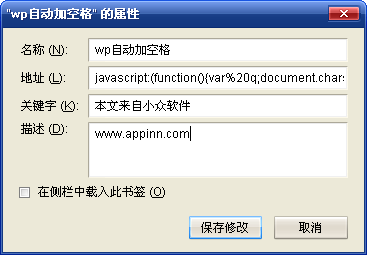
[煎蛋](http://jandan.net/)有个规矩:数字,英文和中文交界的地方要留空格。这是个非常好的习惯,可以让读者看文章更轻松。想要证据?打开 word 输入写点中英文看看吧。强烈呼吁所有写博的朋友都养成这个习惯。只是有时候会忘记或者懒得空格,所以就有了这个小书签。适合 wordpress 用户。因为发生很奇怪的问题,我没办法把下面的代码写成一个链接,所以只能委屈大家新建一个书签,在地址中粘贴下面的代码。
javascript:(function(){var q;q=document.getElementById(‘content’).value;q=q.replace(/(\[a-zA-Z0-9~!@#\\$%\\^&\\\*-\_\\+=,<\\.>/\\?:\\%22\]+)/g,%22%20$1%20%22);q=q.replace(/%20’%20/g,%22’%22);q=q.replace(/%20%20/g,%22>%22);q=q.replace(/(%20+)/g,%22%20%22);document.getElementById(‘content’).value=q;})();
其他看图片设置:
**5 、在线小书签工具**
[Bookmarklet Builder](http://subsimple.com/bookmarklets/jsbuilder.htm) 方便书写小书签的工具。对于开发者,可以把多行代码变成一行( Compress )。对于学习者,可以把小书签展开成多行( Format )。
[blummy](http://blummy.com/) 小书签太多了怎么办?建立几个文件夹分类,或者使用这个服务,详细介绍[请看凡人弄的文章](http://www.frnong.com/blog/archives/200)
另外 realazy 的文章在讨论[写 bookmarklet 的注意点](http://realazy.org/blog/2008/02/25/bookmarklet/)。
这里还有一篇教学:[如何为一个搜索引擎创建搜索小书签(英文)](http://anonymouse.org/cgi-bin/anon-www.cgi/http://mozilla.gunnars.net/bookmarklets/trans-how-to.html)
**6 、小结与快捷键秘籍**
现在很多的 web 2.0 都提供这样方便的提交内容的小书签,比如 Google Reader 的 note,还有 evernote 等等,非常多。所以我们要善用这些神奇的小工具来提供上网效率。
看到这里,你会觉得 Bookmarklet 和火狐扩展 [Greasemonkey](https://addons.mozilla.org/firefox/addon/748) ( IE 下的 IE7Pro 也有这个扩展)的功能重复了。 BookMarklet 是手动, Greasemonkey 是全自动的。 BookMarklet 是作为 Greasemonkey 的一个补充工具。
**IE 用户可以为小书签设置一个快捷键:**
在小书签上右击选择“属性”,在“快捷键”一栏输入按下快捷键,然后点击确定,IE 会弹出一个对话框:“javascript”协议没有已注册的程序。是否仍保留这一目标?选择“是”。用法当然是按下设置好的快捷键了。

**火狐用户可以设置一个“关键字”,关键字可长可短:**
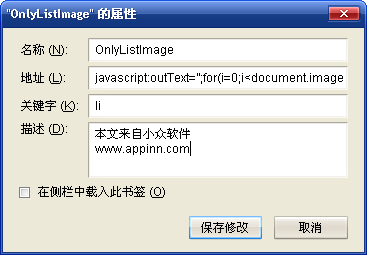
同样是在小书签上右击选择“属性”,比如我为 OnlyListImage 设置的关键字为 li。用法是:在地址栏输入 li,并回车。(快速把光标定位到地址栏的快捷键是 Alt + D)
**7 、读者的补充**
[尘世客](http://hi.baidu.com/fatalist) 补充:
补充个划词翻译:[沪江小D](http://dict.hjenglish.com/tools/
)
[Vane](http://www.vaneshi.com/share) 补充:
推荐一个[搜索 verycd 资源的书签](http://www.stopdesign.cn/2008/03/verycdbookmarklets.html),还有一个[blackr](http://blackr.net/) 浏览 flickr 时去除其他页面元素只留图片。
[thw](http://www.thws.cn) 补充:
罗列当前页面上的链接并使其可点击
javascript:(function(){as=document.getElementsByTagName("a");str="";for(i=0;i"+as\[i\].href+"\\n"}str+="";with(window.open()){document.write(str);document.close();}})()
[likin](http://zjulee.com) 补充:
来迟啦,我也来推荐一个,网页日翻中:
javascript:location.href=%22http://www.worldlingo.com/wl/mstranslate/UP26384/T1/P2/l/zh/microsoft/computer\_translation.html?wl\_lp=JA-zh&wl\_fl=3&wl\_g\_table=-3&wl\_url=%22+location.href;
“JA-zh”换掉就可实现其它语言之间的翻译,部分如下:
ENzh=〉英翻中
zhEN=〉中翻英
JA-zh=〉日翻中
zh-JA=〉中翻日
ZH\_CN-ZH\_TW=〉简转繁
ZH\_TW-ZH\_CN=〉繁转简
DEzh=〉德翻中
NL-zh=〉荷翻中
ELzh=〉希翻中
ESzh=〉西翻中
PTzh=〉葡翻中
RUzh=〉俄翻中
KO-zh=〉韩翻中
## Topics
**分类目录:** [电脑技巧](https://www.appinn.com/category/pcskill/?output_format=md)
**标签:** [bookmarklet](https://www.appinn.com/tag/bookmarklet/?output_format=md), [小书签](https://www.appinn.com/tag/%e5%b0%8f%e4%b9%a6%e7%ad%be/?output_format=md), [工具](https://www.appinn.com/tag/%e5%b7%a5%e5%85%b7/?output_format=md), [教程](https://www.appinn.com/tag/%e6%95%99%e7%a8%8b/?output_format=md), [浏览器](https://www.appinn.com/tag/%e6%b5%8f%e8%a7%88%e5%99%a8/?output_format=md), [精选](https://www.appinn.com/tag/selected/?output_format=md)